For individual decision-makers

Make the decision. Keep the lesson.

Decision journal software is most useful when you return to the record. Capture your evidence, assumptions, options, forecast, and confidence before hindsight changes the story. Set a Reality Date to compare those expectations with what actually happens.

The complete loop

Set a Reality Date. Give experience a chance to become useful learning.

RouteMapCommitReturn
01

Before

Give your expectations something concrete to test.

Describe the situation, distinguish observations from interpretations, compare real options, and state what you expect to happen with an honest level of confidence.

  • Situation and stakes
  • Evidence and assumptions
  • Options considered
  • Forecast and confidence
02

At commitment

Set a Reality Date.

Choose when there should be enough information to review the outcome. Commit the decision, rationale, intended action, and Reality Date as a fixed point of reference. Record what would make you reconsider sooner so a review date does not become a reason to ignore new evidence.

  • Committed decision record
  • Rationale at the time
  • Next action
  • Reality Date
03

After

Review process separately from outcome.

A good process can produce a bad outcome and a weak process can get lucky. Compare expectations with events: what did you see clearly, which assumption needs revisiting, and what was outside your control? Examine both the reasoning and the result before deciding what to carry forward.

  • Actual outcome
  • Expectation gap
  • Process review
  • Lessons for next time

After the decision

Don’t wait for the outcome review to notice a change of course.

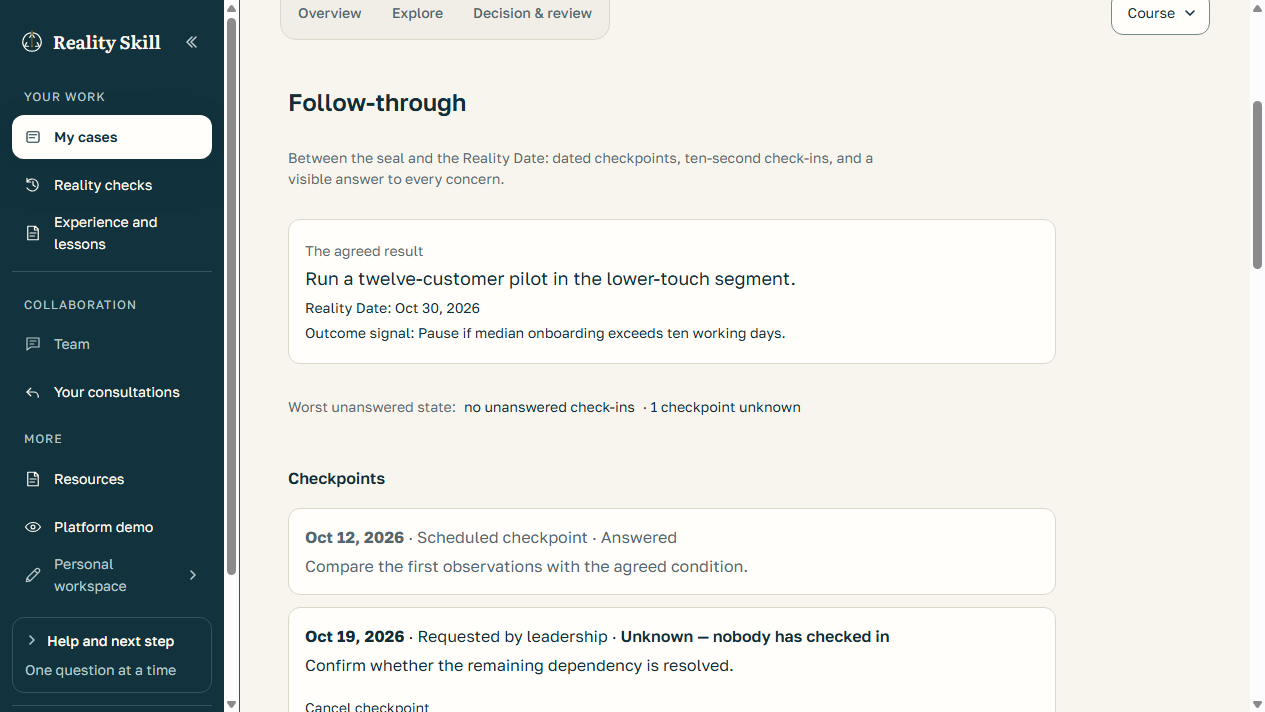
Keep the agreed result visible between commitment and the Reality Date. Checkpoints and quick updates help people surface problems while there is still time to respond.

  1. Commit
  2. Check in
  3. Surface concerns
  4. Adjust course
  5. Review
Explore follow-through in the demo
Actual app screen · fictional sample company and prepared events, not a customer result.
  • Set dated checkpoints before the final review, or raise a concern when something changes.
  • Record a quick check-in: on course, drifting, off course, or unable to assess. Explain what changed and request leadership help when needed.
  • The owner side can continue, ask for clarification, or open a linked course review without rewriting the original commitment.
  • Find outstanding updates in the relevant attention lists, review agenda and calendar feed.
Explore follow-through in the demo →

Personal checkpoints are included in free access. Company and advisor oversight follows existing permissions. These are human-reported updates, not automated project monitoring, email alerts or a guarantee of success. Ordinary check-ins are not anonymous protected feedback; their audience is shown in the app.

More ways to reach a useful decision

Capture first. Organize when ready.

Write or paste your information without classifying every sentence. Optional AI organization proposes statements and labels; you review what to accept.

Personal and Company · AI availability and usage limits apply.
Find a better route, systematically.

Step back from a proposed solution to the goal, separate conflicting requirements, or turn an objection into a design condition. Save a candidate before deliberately adopting it as an option.

Personal and Company · the guided exploration itself makes no AI calls.
Keep unfinished writing.

Supported signed-in writing forms save private drafts while you type. Saving a draft does not submit, share, commit or send the writing to AI.

Requires a working connection for server saves; check the save status. Guest forms and uploads have different limits.
Hear beyond the core team.

Company Consultation gathers input from 8–100 invited company members without expanding the 2–7-person Team Room or transferring decision authority. Track unresolved contributions and owner responses.

Company workflow · named or anonymous-to-audience input, within its access rules.
Protect dissent, with accountable moderation.

Authorized participants can use protected feedback and later choose to reveal authorship. Eligible moderators can hide abusive content with a recorded reason and a reconsideration path.

Company leaders have no authorship lookup. Context may still suggest identity; this is not anonymity from infrastructure operators.
See what needs your advice.

Advisors can review current requests, client replies and follow-up requests across authorized engagements. Follow-through attention is limited to explicitly shared cases.

Advisor access requires admission and current client authorization; browsing the demo grants neither.

Questions, answered

What people usually want to know.

Why use decision journal software instead of a document?

A document can store notes, but Reality Skill provides a consistent decision structure, a committed record, a Reality Date, and an explicit outcome-review loop.

What kinds of decisions fit a decision journal?

It is most useful when the decision is consequential, uncertain, repeatable, or likely to teach you something after the result becomes visible.

What is a Reality Date?

A Reality Date is the date you choose to return to a committed decision and compare your forecast with the actual outcome. It creates a specific opportunity to review assumptions, distinguish reasoning from luck, and identify what to consider next time.

For your leadership team

Make better decision practice part of company operations.

See the platform in action, discuss an organization license, and identify an initial decision your team can work through.

Request a platform demo